Building My Self-Hosted Home Media Server with Docker
A complete walkthrough of my home server — TrueNAS for backups, Proxmox for virtualization, and a fully automated Docker media stack with the *Arr apps and Jellyfin.

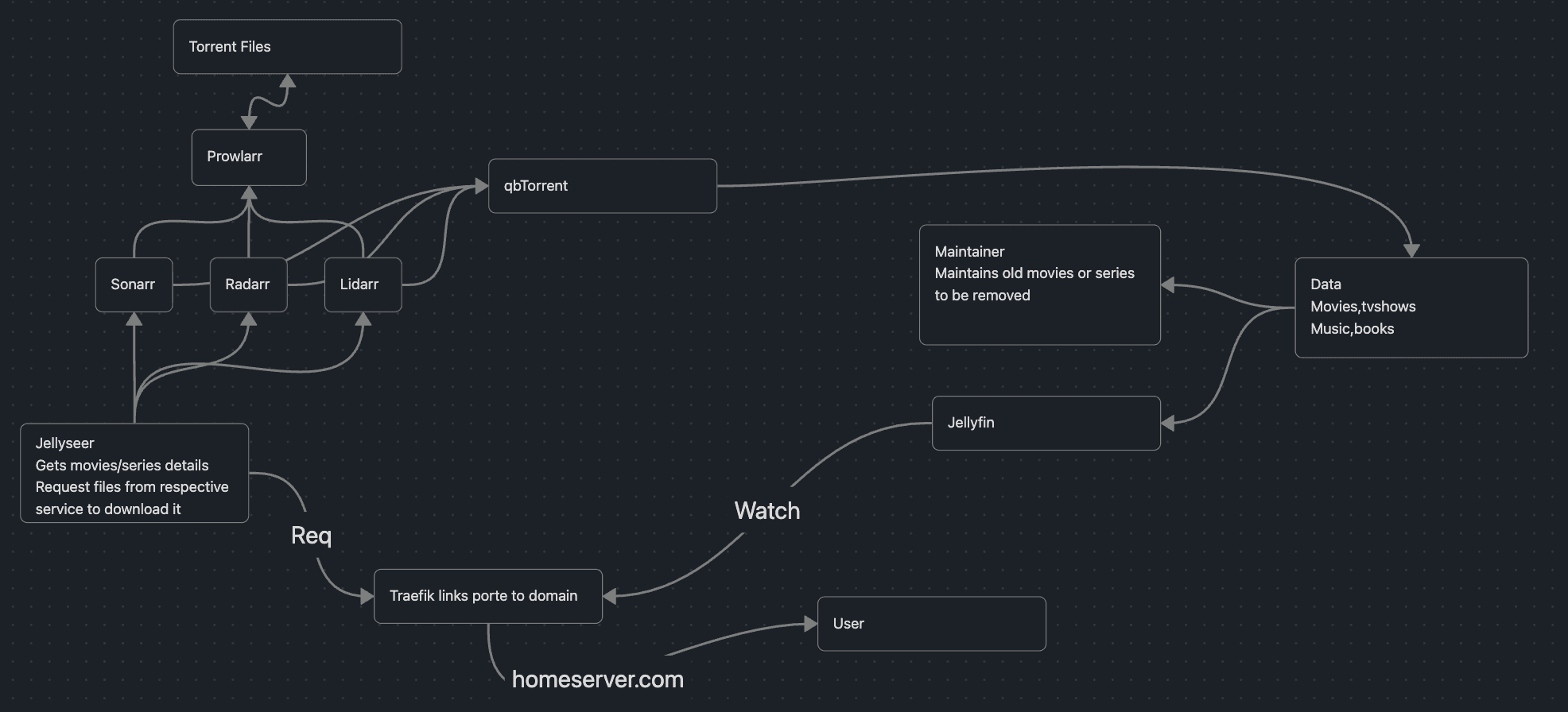
How my home server is put together end to end: a TrueNAS box handling backups and photos, a Proxmox box running my VMs and media stack, and a fully automated Docker pipeline that turns "search for a movie" into a watchable file with zero manual steps in between.
Why I built a home server #
I've always wanted a system where I could search for a movie or TV show, click Request, and let everything else happen automatically — no manually hunting for torrents, no manually downloading files, no organizing folders by hand, no trying to remember what I've already watched.
After experimenting with a bunch of different tools, I ended up with a fully self-hosted setup split across two machines, each doing one job well.
The hardware: two machines, two jobs #
Setup one — TrueNAS (storage & backup) #
This box exists for one reason: don't lose my data. It runs two 1TB hard drives mirrored together (RAID1-style), so if one drive dies, the other still has everything — photos, documents, all of it.
On top of that storage, two apps handle the actual backup workflows:
- Immich — photo backup and management, essentially my self-hosted alternative to Google Photos.
- Nextcloud — general file storage and sync, for everything that isn't a photo.
Setup two — Proxmox (virtualization & media) #
This box is the workhorse. It runs Proxmox as a hypervisor, hosting multiple VMs side by side — an Ubuntu VM and a Windows 10 VM — on a 2TB hard drive for media storage plus a 256GB SSD for the OS and the apps themselves, keeping fast storage separate from bulk media storage.
The Ubuntu VM is where the entire Docker-based media stack lives — which is the part of this setup I actually want to talk about in detail.
The overall architecture #
The media stack is built around one idea: requesting something should be the only manual step. Everything after that — finding it, downloading it, importing it, organizing it — happens on its own.
User
 │
 ▼ (homeserver.com via Traefik)
Jellyseerr ── Req: gets movie/series details,
 │            requests the file from the right service
 ├── Sonarr   (TV)
 ├── Radarr   (Movies)
 └── Lidarr   (Music)
       │
       ▼
   Prowlarr ── searches configured indexers
       │
       ▼
   qBittorrent ── downloads the torrent
       │
       ▼
Sonarr / Radarr / Lidarr ── import & organize into the library
       │
       ▼
     Data (Movies, TV shows, Music, Books)
       │              │
       ▼              ▼
   Jellyfin       Maintainerr
 (streams it)   (cleans up old/
       │          unwatched media)
       ▼
     Watch (via Traefik → homeserver.com) → User
Walking through the components #
| Component | Role |
|---|---|
| Traefik | Reverse proxy — maps every service to a subdomain under homeserver.com so nothing needs a raw IP:port to access. |
| Jellyseerr | The front door. A user picks a movie or show, Jellyseerr pulls the metadata and sends a request to the right service. |
| Sonarr / Radarr / Lidarr | One manager per media type — TV, movies, and music respectively. Each tracks what's wanted, what's already downloaded, and hands searches off to Prowlarr. |
| Prowlarr | A single indexer manager shared by Sonarr, Radarr, and Lidarr, so indexers only need to be configured once instead of three times. |
| qBittorrent | The download client. Once Prowlarr finds a matching release, qBittorrent grabs it. |
| Jellyfin | The media server — organizes the library and streams everything to any device. |
| Maintainerr | Watches the library and automatically flags/removes old or unwatched movies and shows based on rules I've set, so storage doesn't just grow forever. |
The request flow, step by step #
- I open Jellyseerr (through Traefik, at
homeserver.com) and search for something. - Jellyseerr fetches the details and sends a request to Sonarr, Radarr, or Lidarr depending on the media type.
- That service asks Prowlarr to search its configured indexers for a matching release.
- Prowlarr returns candidate torrent files, and the best match gets sent to qBittorrent.
- qBittorrent downloads it, then hands it back to Sonarr/Radarr/Lidarr to import, rename, and file it into the library correctly.
- The finished file lands in the shared media library (movies, TV shows, music, books).
- Jellyfin picks it up automatically and it's ready to stream — no manual folder work, ever.
- In the background, Maintainerr keeps an eye on the library and clears out old or unwatched titles on a schedule, so the 2TB drive doesn't quietly fill up.
Key takeaways #
- Splitting the home server into two purpose-built machines (TrueNAS for "don't lose this data," Proxmox for "run everything else") kept each box simple and easy to reason about.
- Mirrored drives on TrueNAS mean a single hard drive failure doesn't turn into a data-loss event.
- Centralizing indexers in Prowlarr instead of configuring them separately in Sonarr, Radarr, and Lidarr saved a lot of repeated setup.
- Automating cleanup with Maintainerr was as important as automating downloads — without it, storage just fills up silently.
- Traefik in front of everything means every service gets a clean subdomain instead of a bookmark full of
ip:portaddresses.
Conclusion #
The end result is a home server where requesting a movie is genuinely the only thing I ever do by hand. Everything else — searching, downloading, importing, organizing, streaming, and even cleaning up old media — runs on its own. It's been a fun project to build piece by piece, and there's still room to grow: more storage, more automation, maybe a second Proxmox node down the line.